This blog will go deep down into concepts around Internet of Things (IoT), its applications, and how to get started with IoT development.
📌 IoT Series (Part 2 of 5): This is the second article in our 5-part IoT series.

Table of contents
Open Table of contents
Components of IoT Applications
The two main components of an IoT Application are the Internet and the Thing
The Thing
-
The Thing refers to the device that can interact with the physical world.
-
These devices are usually small, low-priced, running at low-speed and consuming low power.
-
For example, a simple MCU with kilobytes of RAM (as opposed to gigabytes in a PC) running at only a few hundred megahertz (as opposed to gigahertz in a PC), but consuming very low power that they can run weeks and months or even years on batteries.
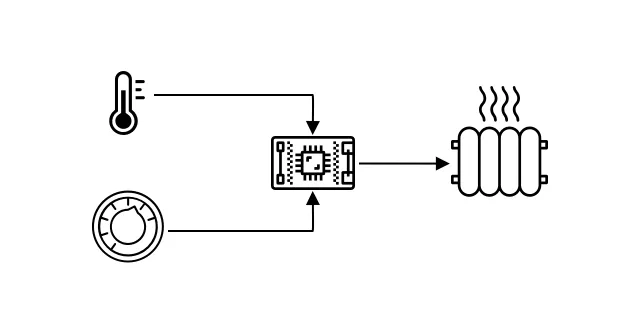
One typical example is the smart thermostat - device that has a temperature sensor, the temperature sensor can detect the room is too cold and the actuator can turn on the heater to warm up the room.
The Internet
-
The Internet side of IoT consists applications that can process data from the Thing and send data back to the Thing to perform actions. These applications are usually running on cloud servers and can be accessed via web browsers or mobile apps.
-
Typical used are cloud service for security, making decisions, store sensor data.
-
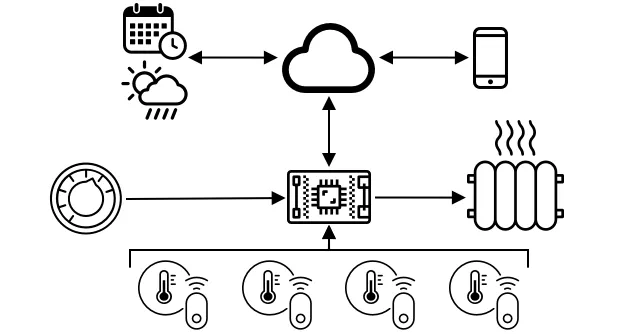
Devices also don’t always connect to each other via Wifi or wired-connection. Some devices can use mesh network such as Bluetooth, connecting via a hub device that has an internet connection.
-
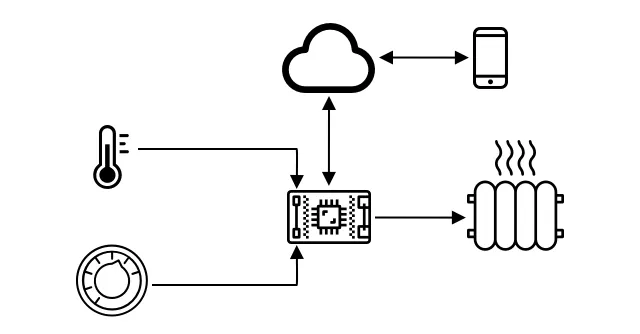
With the example of the Thermostat, we can use home Wifi to connect to cloud service to store data or other services that the homeowner want like sending to mobile app and the homeowner can turn on or off…
-
Even smarter version could use AI in cloud service for making decisions like turning on or off heater based on the calendar like the rainy day, summer, winter, …
Deeper dive into microcontrollers
In the last blog, I already mentioned about Microcontroller - MCU. Let’s now deeper dive into it.
The CPU
- The brain of the microcontroller, CPU can have multiple cores that can work to run your code.
- CPUs rely on a clock to tick many millions or billions of times per second. Each tick, or cycle is the actions that CPU can take.
- CPU speed is measured in Hertz (Hz), a standard unit where 1 Hz means one cycle or clock tick per second.
- CPU speeds are often at megahertz (MHz) or gigahertz (GHz). 1 MHz = 1 million cycles per second, 1 GHz = 1 billion cycles per second.
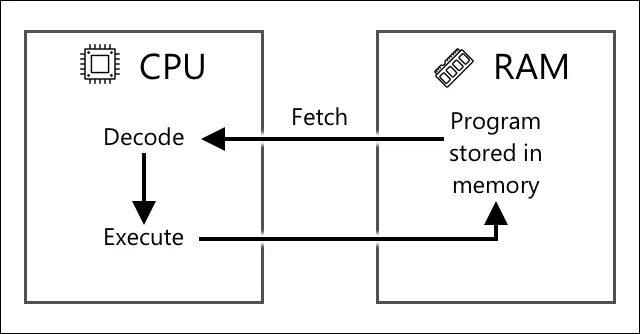
- CPUs execute programs using the fetch-decode-execute cycle. It executes using arithmetic logic unit (ALU) to perform addition from 2 registers.
The Memory
Microcontrollers typically feature two types of memory, which are thousands of times smaller than those in a typical PC:
- Program Memory (Non-volatile): Stores your program code. Data is retained even when power is turned off.
- RAM (Volatile): Used while your program runs to store variables and sensor data. Data is reset when power is lost.
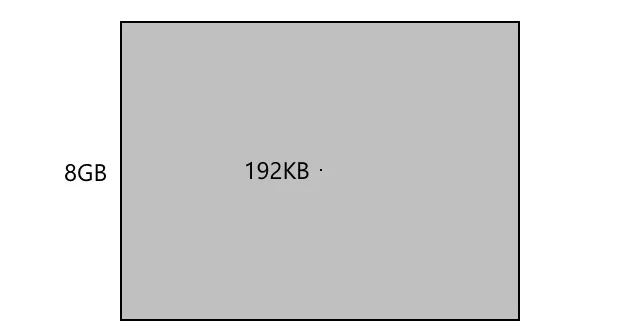
RAM Scale: A typical PC has 8 Gigabytes (GB) of RAM, whereas a microcontroller may only have Kilobytes (KB) (e.g. 192KB) — over 40,000 times smaller!
Input/Output (I/O) Connections
Microcontrollers interact with the physical world through General-Purpose Input/Output (GPIO) pins. These pins are configured in software to handle data flow:
- Input Pins (🧠 ⬅️): Used to read incoming values and data from sensors (e.g., temperature, humidity, light).
- Output Pins (🧠 ➡️): Used to send control signals and instructions to actuators (e.g., turning on a light, driving a motor, starting a heater).
GPIO Flexibility: The same pin can be configured via code to function either as an input or an output depending on your project requirements.
Framework and operating systems
- Due to their low speed and memory size, MCUs don’t run an OS — remember MCUs are programmed to perform a very specific task, unlike general purpose PCs or Macs.
- To program an MCU, you will need to use a framework that supports you to build code that the MCU can run, using APIs to talk with other devices.
Arduino

Arduino is the most popular open-source electronics platform, coded in C/C++ for fast execution and a small binary footprint on microcontrollers.
An Arduino program (called a sketch) revolves around two core functions:
setup(): Runs once on startup to initialize pins, WiFi, and cloud connections.loop(): Runs continuously to process sensor data and trigger actuators.
Power Saving: Sketches often include a delay in loop() (e.g., delay(10000)) allowing the device to sleep and conserve battery between readings.
Deeper dive into single-board computers
Unlike microcontrollers, Single-Board Computers (SBCs) are full-featured computers running complete operating systems (typically Linux).
The Raspberry Pi Ecosystem
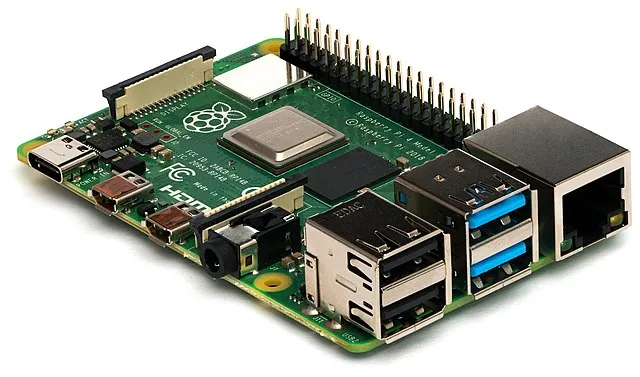
Created by the UK-based Raspberry Pi Foundation, the Raspberry Pi is the most popular SBC for IoT development. All variants run Raspberry Pi OS (Debian Linux) on ARM-based processors.
Key Variants:
- Raspberry Pi 4B (~$35): Quad-core 1.5GHz CPU, 2–8GB RAM, 4K dual-HDMI, USB 3.0, and 40 GPIO pins.
- Raspberry Pi Zero / Zero W (~10): Ultra-compact, single-core 1GHz CPU, 512MB RAM, and 40 GPIO pins for low-power projects.
- Compute Module: Compact version built without consumer ports, designed for commercial IoT hardware integration.
Programming Single-Board Computers
Because SBCs run a full OS, they support virtually any programming language:
- Python is the primary choice for Pi IoT applications due to extensive library support and HATs (hardware expansion boards connected via GPIO pins).
- Edge & Industrial Use: SBCs are capable of running complex tasks locally, including edge computing and machine learning models.
📖 Series Navigation
👈 Back to Part 1: Introduction to Internet of Things (IoT)
👉 Continue to Part 3: Sensors and Actuators in Internet of Things (IoT)