This blog gives you a clear and simple overview of how a GPU executes code, how threads run under the hood, and how to optimize your CUDA programs.

Table of contents
Open Table of contents
1. Overview of GPU Architecture
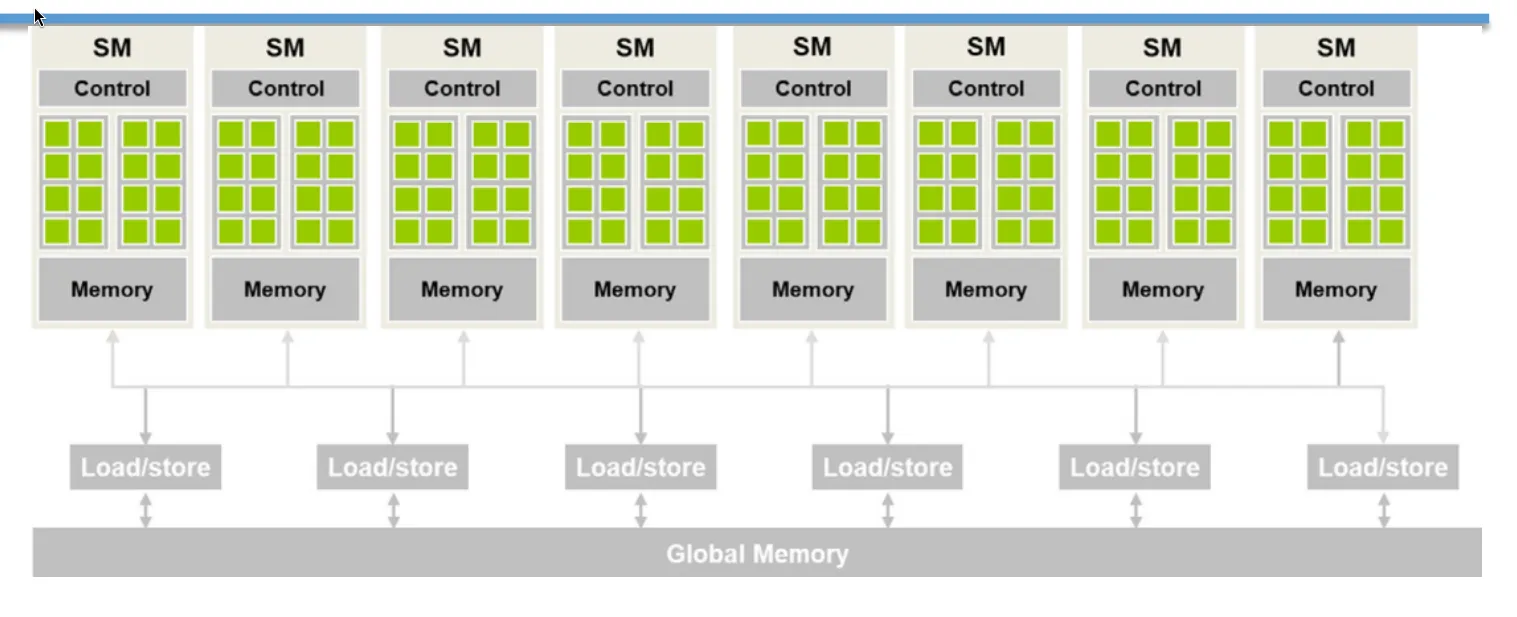 Figure 1: Architectural overview of a modern GPU hierarchy.
- A GPU contains multiple SMs (Streaming Multiprocessors).
- Each SM contains multiple SPs (Streaming Processors, commonly called CUDA Cores).
Hardware vs. Software Mapping
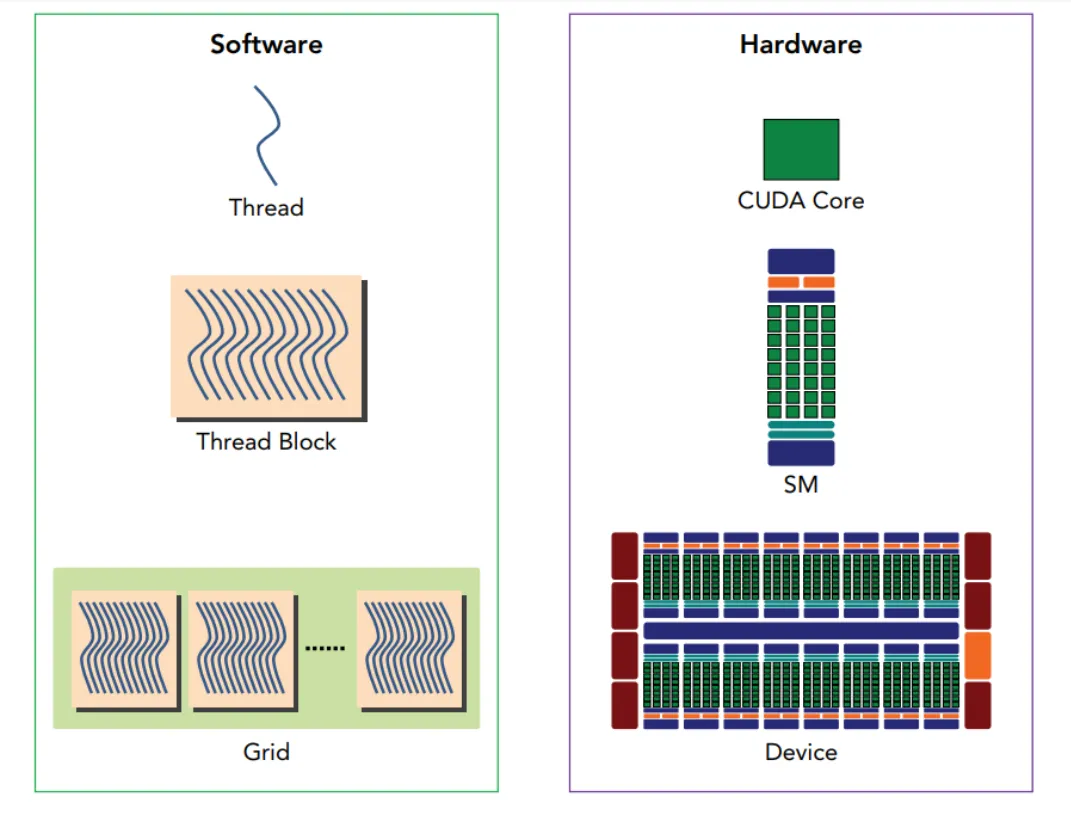 Figure 2: Mapping between software (CUDA) and physical hardware.
CUDA virtualizes physical hardware to make parallel programming simple and scalable:
- Block Virtual SM
- Thread Virtual SP (CUDA Core)
- When the Host (CPU) launches a kernel, it creates a Grid of Blocks. Each block is assigned to an available physical SM.
- Each SM can run more than one Block at the same time (depending on available registers, shared memory, and block size).
Block Scheduling & Queue
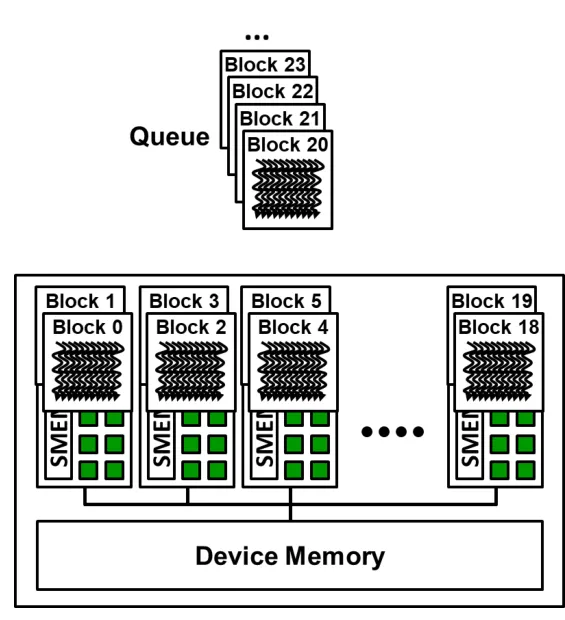 Figure 3: Hardware Block scheduler dispatching Blocks from the queue into available SMs.
- Blocks waiting to run sit in a hardware Block Queue.
- As soon as an active Block finishes, the scheduler pulls the next pending Block from the queue into the free SM slot.
Blocks execute in arbitrary order — they can run concurrently, sequentially, or interleaved across any SM.
Blocks Must Be Independent 🛑
To run on any GPU (from a laptop chip to a datacenter cluster), blocks must never depend on each other:
- No inter-block synchronization: Threads in different blocks cannot wait on or talk to each other directly.
- The Deadlock Trap: If Block A busy-waits on a variable from Block B, but Block B is still waiting in the hardware queue, Block A will wait forever Deadlock!
// ❌ INCORRECT: Busy-waiting across blocks causes deadlocks!
__global__ void bad_interblock(volatile int* flag, int* data) {
    if (blockIdx.x == 0 && threadIdx.x == 0) {
        while (*flag == 0) { } // Block 0 waits for Block 1
        data[0] = data[1];
    }
    if (blockIdx.x == 1 && threadIdx.x == 0) {
        data[1] = 42;
        *flag = 1;             // Block 1 might never be scheduled!
    }
}How to communicate safely across blocks:
- Kernel boundaries: Split work into separate kernel launches. The end of a kernel acts as a global barrier.
- Atomic operations: Use atomic functions (
atomicAdd, etc.) for race-free updates without waiting.
Cooperation Inside a Block 🤝
While different blocks are independent, threads inside the same block can share data and synchronize:
- Shared Memory (
__shared__): Fast on-chip memory shared by all threads in that block. - Barrier Synchronization (
__syncthreads()):- Every thread in the block pauses at the barrier.
- Execution resumes only after all threads in the block arrive.
- Ensures memory writes made before the barrier are visible to all threads after it.
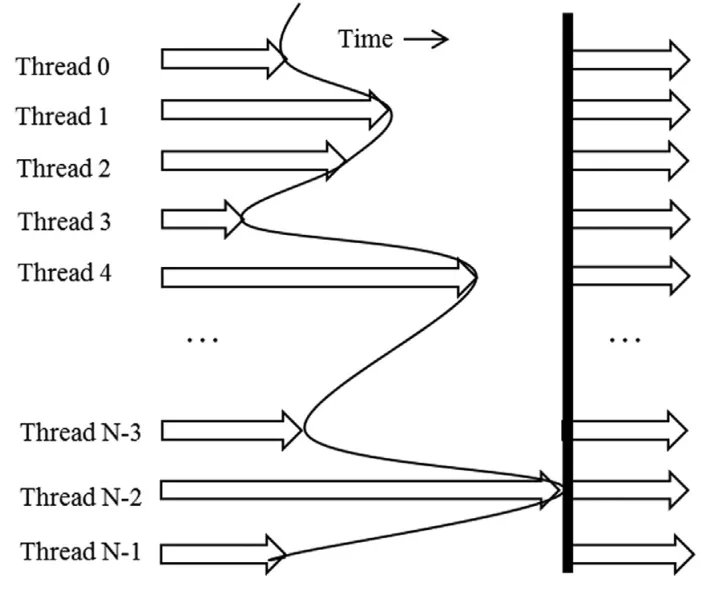 Figure 4: Barrier synchronization (__syncthreads) coordinating threads over time.
Barrier Pitfalls to Avoid ⚠️
1. Divergent Barriers
__syncthreads() must be reached by all threads in a block. Never put it inside a branch where threads split paths:
// ❌ WRONG: Threads split paths -> undefined behavior or hang
if (threadIdx.x % 2 == 0) {
    __syncthreads();
} else {
    __syncthreads();
}

// ✔️ CORRECT: Condition is identical for all threads in the block
if (blockIdx.x % 2 == 0) {
    __syncthreads(); // Safe: every thread in the block takes this path
}
2. Early Return
Calling return early strands the remaining threads waiting at __syncthreads():
// ❌ WRONG: Out-of-bounds threads exit early, stranding others
if (t >= count) return;
float v = a[start + count - 1 - t];
__syncthreads();
a[start + t] = v;

// ✔️ CORRECT: Guard only the memory work, not the barrier
float v = 0.0f;
if (t < count) v = a[start + count - 1 - t];
__syncthreads();                             // ALL threads arrive
if (t < count) a[start + t] = v;
2. Warps and SIMT Execution
What is a Warp? ⚡
In CUDA code, we write kernels as if each thread runs independently. But hardware executes threads in bundles: the GPU groups 32 threads into a unit called a Warp.
Put simply: 1 Warp = 32 threads running together.
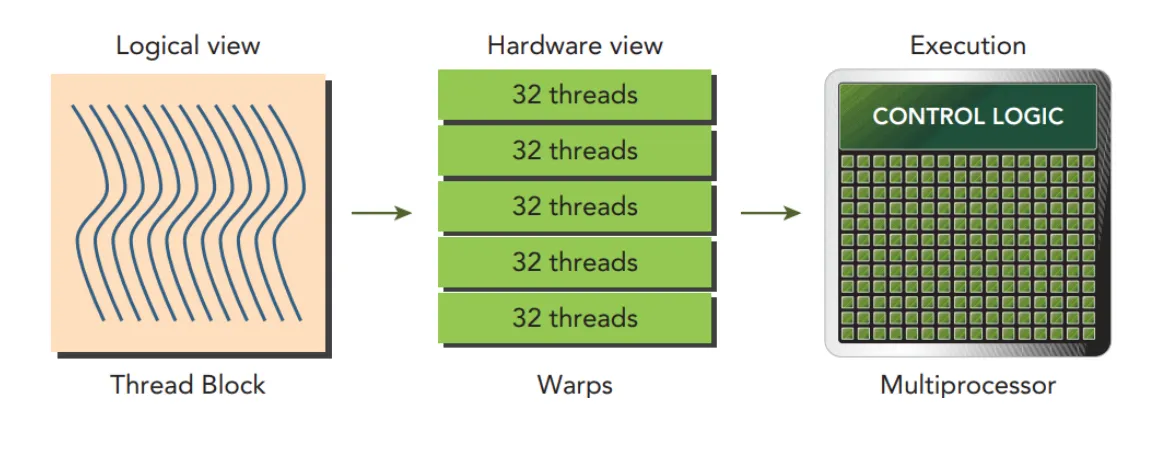 Figure 5: Logical Thread Blocks partitioned into 32-thread hardware Warps executed by an SM.
- Software View (SIMT — Single Instruction, Multiple Threads):
Every thread has its own thread ID, registers, and program counter. - Hardware Reality (Lockstep Execution):
An SM does not have separate instruction decoders for each core. Instead, one instruction unit issues one instruction at a time to all 32 threads in the warp simultaneously.
How is a Block Divided into Warps? 🧩
Regardless of whether your block is 1D, 2D, or 3D, the hardware flattens threads into a 1D list and chunks them into groups of 32:
- 1D Blocks: Consecutive threads form each warp:
-
Warp Padding: If your block size is not a multiple of 32 (e.g. 50 threads), the hardware allocates warps (64 slots). The 14 extra threads are padded as inactive lanes—they do no work but still consume registers!
-
2D Blocks: Flattened row-major into 1D, then sliced into warps:
- 3D Blocks: Sliced along , then , then :
Practice Quiz: Warp Thread Mapping 🧠
Question 1: Block (16, 16)
Which threads form Warp 3?
Reveal Solution
Warp 3 covers linear thread indices 96 to 127.
Each row has threads:
- Threads : row ().
- Threads : row ().
Answer: Warp 3 contains all threads from rows 6 and 7 ( for all ).
Question 2: Block (8, 8)
Which threads form Warp 1?
Reveal Solution
Warp 1 covers linear thread indices 32 to 63.
With :
- through .
Answer: Warp 1 contains rows 4, 5, 6, and 7 ( for all ).
Question 3: Block (4, 4, 4)
How many warps are created, and which values are in Warp 0?
Reveal Solution
Each -slice contains threads:
- covers threads .
- covers threads .
Answer: 2 warps. Warp 0 covers all threads in slices and .
Question 4: Block (30, 2)
How many warps are created, and which threads are in Warp 1?
Reveal Solution
Warp 1 covers linear indices 32 to 59 (plus 4 inactive padding slots):
- Index 32: , .
- Index 59: , .
Answer: 2 warps. Warp 1 contains threads with and (with 4 inactive padded threads).
What is Warp Divergence? ⚠️
Because all 32 threads in a warp share one instruction unit, what happens when an if / else condition evaluates to true for some threads and false for others?
This is called Warp Divergence (or Branch Divergence).
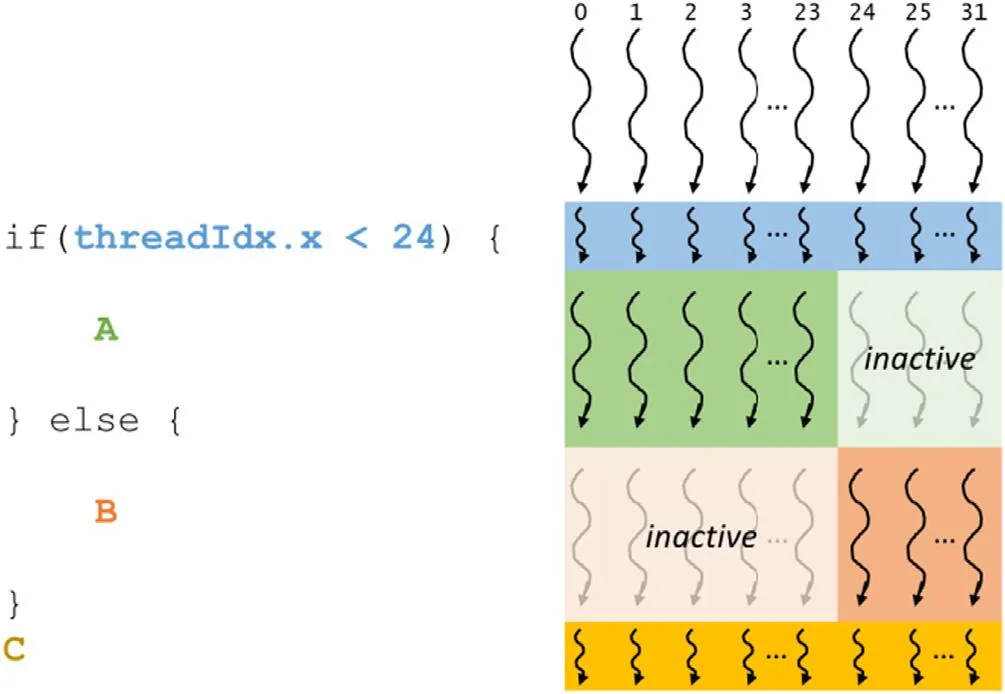 Figure 6: Warp Divergence executing branching paths serially with inactive threads masked out.
Hardware Mechanism: Predicated Execution
The hardware cannot split one warp into two to run different branches simultaneously:
- Serial Execution: The warp executes the
ifpath andelsepath one after another. - Masking: During the
ifpath, threads that tookelseare disabled (masked off). During theelsepath, threads that tookifare disabled.
The output remains correct, but execution takes twice as long because the paths run serially!
How to Avoid Warp Divergence
Align branch conditions to multiples of 32 threads so all threads in a warp take the same branch together:
// ❌ HIGH DIVERGENCE: Adjacent threads alternate true/false
if (i % 2 == 0) {
    C[i] = A[i] * B[i];
} else {
    C[i] = A[i] / B[i];
}

// ✔️ NO DIVERGENCE: Threads are grouped by warps (multiples of 32)
// Warp 0 (i = 0..31):   (i / 32) is even -> all 32 threads multiply
// Warp 1 (i = 32..63):  (i / 32) is odd  -> all 32 threads divide
if ((i / 32) % 2 == 0) {
    C[i] = A[i] * B[i];
} else {
    C[i] = A[i] / B[i];
}Branching on blockIdx never causes divergence because all threads in the same block share the same blockIdx.
3. Latency Hiding & Warp Scheduling 🔄
Why does an SM hold up to 64 warps (2,048 threads) when it only has physical cores to execute 1 to 4 instructions per cycle?
The reason is Latency Hiding:
- Math instructions (FP32 ALU): Take ~4 clock cycles.
- Global memory access (DRAM): Takes 400–800 clock cycles ( slower!).
If an SM held only as many threads as it had physical cores, the cores would sit idle for hundreds of cycles waiting for memory data. By keeping dozens of warps resident on the SM, the scheduler can immediately swap to another ready warp whenever a warp waits on memory.
The 4 Warp States 🚥
Inside each SM, the Warp Scheduler categorizes resident warps into four states:
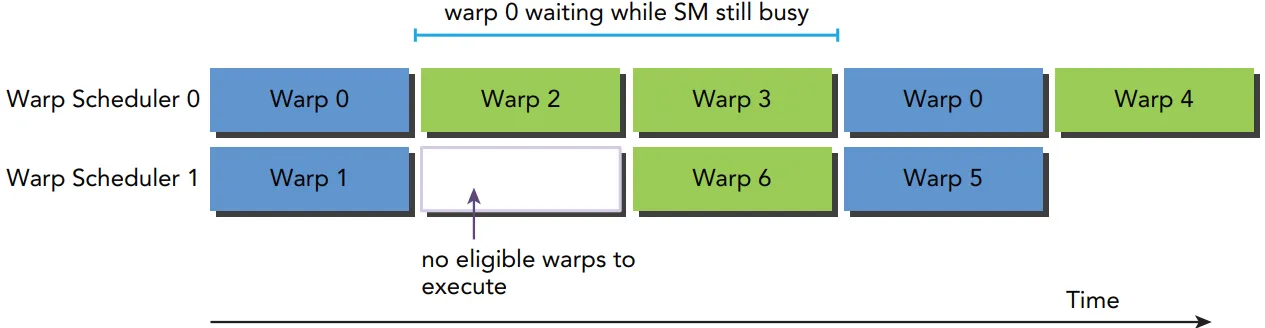 Figure 7: Hardware transition flow across Active, Stalled, Eligible, and Selected warp states.
| Warp State | Meaning |
|---|---|
| Active (Resident) | Assigned to the SM with allocated registers (from block start to finish). |
| Stalled | Waiting on a dependency (e.g. DRAM data, barrier synchronization). |
| Eligible | Ready to execute right now (operands ready, execution unit available). |
| Selected | Picked by the scheduler to issue its instruction in the current clock cycle. |
At every clock cycle, the scheduler checks which warps are Eligible, picks one or more (Selected), and sends their instructions to the cores.
Warp Scheduling Flow: Ready, Executing & Suspended 🔄
In practice, warps continuously cycle through a three-stage execution loop:
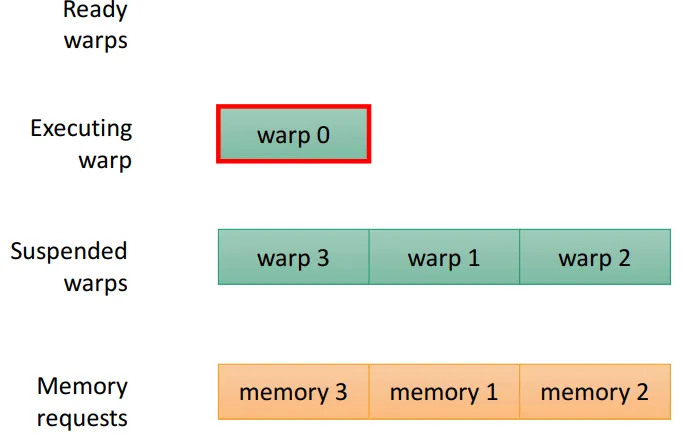 Figure 8: Warp scheduling cycle: Ready Warps, Executing Warp, and Suspended Warps waiting for memory requests.
- Ready Warps (Eligible Pool): Warps that have all data ready and wait to be picked.
- Executing Warp (Selected): The scheduler selects a Ready Warp and issues its instruction to the execution cores.
- Suspended Warps (Memory Request):
- When an executing warp issues a memory request to off-chip DRAM, it moves into Suspended Warps.
- The scheduler does not wait—it immediately picks another warp from Ready Warps.
- Return to Ready: When the memory data returns from DRAM to the SM, the warp moves back into Ready Warps.
Zero-Overhead Context Switching ⚡
On CPUs, thread switching requires saving registers to RAM and restoring them, wasting thousands of cycles.
On GPUs, all registers for all active warps live directly in the SM’s massive on-chip Register File. Switching warps costs zero clock cycles—the scheduler simply points to a different warp in the next clock cycle:
[Cycle 1] ──► Warp 8 is ready ──► Dispatch Instruction (Memory Load)
[Cycle 2] ──► Warp 8 is WAITING for DRAM (Suspended)!
Scheduler instantly switches with 0 penalty:
──► Warp 2 is ready (Eligible) ──► Dispatch Instruction (Math ALU)
[Cycle 3] ──► Warp 14 is ready (Eligible) ──► Dispatch Instruction
...
[Cycle N] ──► Warp 8's DRAM data arrived!
──► Warp 8 returns to Ready pool ──► Resumes execution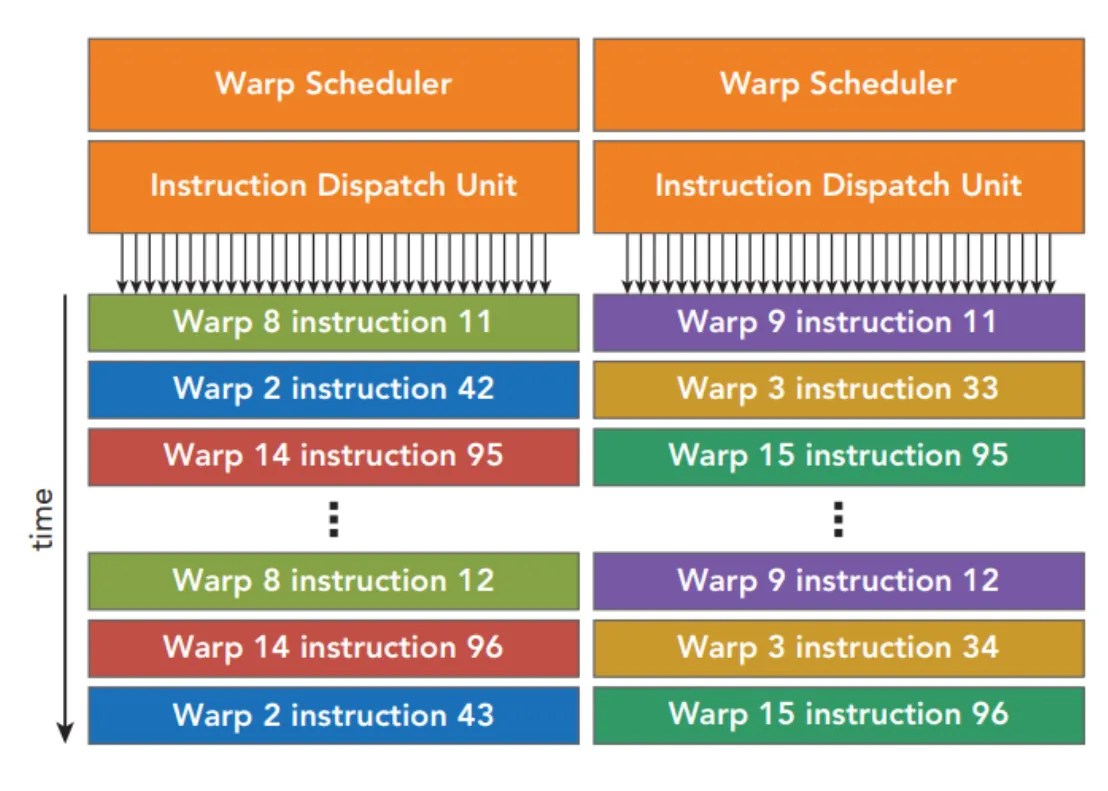 Figure 9: Warp Scheduler and Instruction Dispatch Units cycling through active Warps across time.
4. Hardware Resources & GPU Occupancy 📊
Occupancy measures how full the SM’s warp capacity is:
- Theoretical Occupancy: Calculated before running from resource limits (registers, shared memory, block size).
- Achieved Occupancy: Measured during execution using NVIDIA Nsight Compute (
ncu).
Resource Partitioning (The Limiting Bottlenecks)
Every resident block and warp needs a portion of the SM’s fixed hardware resources:
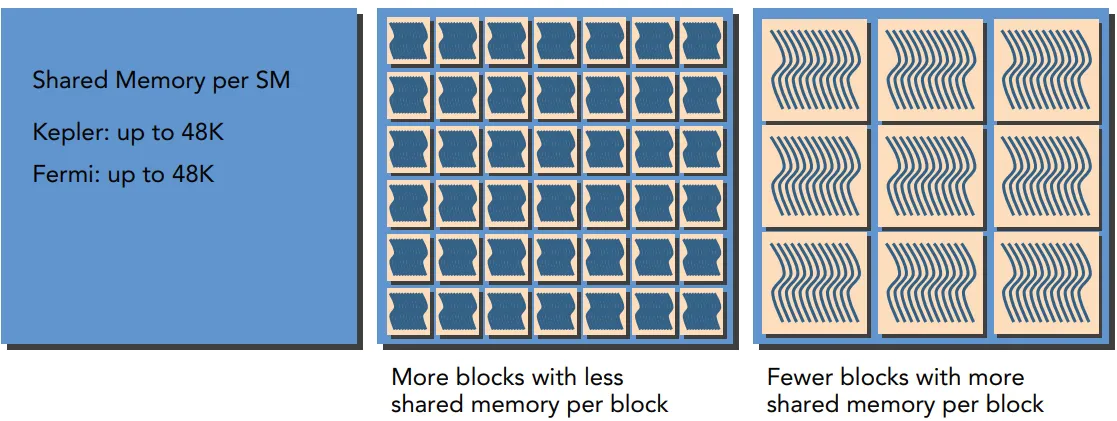 Figure 10: Dynamic hardware resource partitioning across resident blocks and warps in an SM.
| Hardware Resource | Limit per SM (NVIDIA A100) | Limit per SM (Tesla T4) |
|---|---|---|
| Max Block Slots | 32 blocks | 16 blocks |
| Max Warp / Thread Slots | 64 warps (2,048 threads) | 32 warps (1,024 threads) |
| 32-bit Registers | 65,536 registers | 65,536 registers |
| Shared Memory | Up to 164 KB | Up to 64 KB |
The Bottleneck Rule: The number of blocks that can reside on an SM is capped by whichever of these four resources runs out first.
Key Resource Pitfalls to Avoid ⚠️
- Block Size Too Small (e.g. 32 threads/block):
- On an A100 (max 32 blocks/SM), choosing 32 threads/block fits:
- This utilizes only half of the 2,048 available thread slots Occupancy is capped at 50%!
- The “Register Cliff” Effect:
- On an A100 with 512 threads per block:
- At 31 registers/thread: 4 blocks fit ( threads) 100% Occupancy.
- Increasing by just 2 registers to 33 registers/thread: each block takes registers. The 65,536 registers only fit 3 blocks ( registers). The 4th block cannot fit Occupancy drops sharply from 100% to 75%!
- On an A100 with 512 threads per block:
Practical Rules for Block Size Selection 🎯
- Multiple of 32: Always set block dimensions to a multiple of 32 threads.
- Default Baseline: Start with 128 to 256 threads per block (2D: or ).
- Aim for Resident Blocks per SM: Ensures other blocks keep cores busy if one block finishes early.
- Is 100% Occupancy Always Necessary? (Memory-Bound vs Compute-Bound)
- Memory-Bound Kernels (e.g. Vector Add, ReLU): Spends most time waiting for data from slow DRAM (low arithmetic intensity). High occupancy (75–100%) is vital here so the scheduler always has ready warps to hide memory latency.
- Compute-Bound Kernels (e.g. Matrix Multiply GEMM): Spends most time running heavy math on ALUs (high arithmetic intensity). Lower occupancy (25–50%) is completely fine because ALUs are already 100% busy; fewer threads allow each thread to use more registers and shared memory without spilling.
5. Tools Cheatsheet: Inspecting & Profiling 🛠️
Here is a quick summary of the essential command-line tools and compiler flags for inspecting resources, occupancy, and branch divergence:
1. Compiler Flags (nvcc)
# 1. Print register, shared memory, and spill stats during compilation
nvcc -O3 -arch=sm_75 -Xptxas -v kernel.cu

# 2. Limit maximum registers per thread across the entire file
nvcc -maxrregcount=32 kernel.cu

# 3. Compile for profiling without aggressive optimizations (if needed for line debugging)
nvcc -G -arch=sm_75 kernel.cu
2. Kernel Launch Bounds Attribute
// Restrict kernel to at most 256 threads/block and guarantee at least 4 blocks fit per SM
__global__ void __launch_bounds__(256, 4) myKernel(...) {
    // ...
}
3. Profiling with NVIDIA Nsight Compute (ncu)
# 1. Measure achieved occupancy and compare with theoretical occupancy
ncu --section Occupancy ./my_app

# 2. Profile scheduler and warp stall states
ncu --section SchedulerStats --section WarpStateStats ./my_app

# 3. Check warp branch divergence (total divergent branch targets)
ncu --metrics smsp__sass_branch_targets_threads_divergent.sum ./my_app

# 4. Check warp execution efficiency (ratio of 32 active threads per executed instruction)
ncu --metrics smsp__thread_inst_executed_per_inst_executed.ratio ./my_appWatch for Register Spilling: If spill stores or spill loads appear in the nvcc -Xptxas -v output, registers overflowed into slow off-chip DRAM (Local Memory). Never blindly restrict -maxrregcount without verifying spills remain 0!
6. Summary & Conclusion 🎯
To bring everything together, let’s revisit the four fundamental questions from the lecture:
| Part | Core Question | Simple Answer |
|---|---|---|
| Part 1: From Grid to Hardware | Where do my blocks actually run? | Thread blocks are distributed from a hardware Block Queue onto physical SMs. Multiple blocks can reside on the same SM concurrently, and they execute in completely arbitrary, independent order. |
| Part 2: Warps and SIMT | How do 32 threads share one instruction? | The hardware groups threads into Warps (32 threads). A single instruction unit decodes and broadcasts one instruction to all 32 threads at once (SIMT). If threads branch (if/else), paths run serially with inactive lanes masked out. |
| Part 3: Latency Hiding | Why does an SM hold far more threads than it has cores? | Memory access (DRAM) takes 400–800 cycles, while math takes ~4 cycles. The SM holds many resident warps in on-chip registers so the scheduler can swap to a ready warp in 0 cycles whenever another warp is waiting for memory. |
| Part 4: Resources and Occupancy | How do I choose a block size? | Pick a multiple of 32, start with 128–256 threads, and ensure at least 2 blocks fit per SM. Check register usage with nvcc -Xptxas -v to prevent register cliffs and memory spills, then verify with ncu --section Occupancy. |