This post covers CUDA programming from environment setup in Neovim to building, benchmarking, and analyzing vector addition kernels on NVIDIA GPUs.

Table of contents
Open Table of contents
Introduction to CUDA Programming
CUDA (Compute Unified Device Architecture) is NVIDIA’s parallel computing platform and application programming interface (API). It allows developers to leverage the massive throughput of GPUs for compute-intensive algorithms.
In the CUDA programming model:
- Host (CPU): Executes sequential setup code, allocates system RAM, manages memory transfers, and launches kernels.
- Device (GPU): Executes parallel kernel code across thousands of lightweight CUDA cores organized into Grids, Blocks, and Threads.
1. Setting Up CUDA Development in Neovim
Before writing CUDA code, configuring your IDE with diagnostics, syntax highlighting, and auto-completion provides immediate feedback without having to invoke nvcc (NVIDIA CUDA Compiler) on every small edit.
Step 1: Install Treesitter CUDA Parser
In Neovim, install syntax highlighting for CUDA, C++, and C:
:TSInstall cuda cpp cStep 2: Register CUDA Filetypes
Ensure Neovim recognizes .cu and .cuh files as CUDA:
vim.filetype.add({
  extension = {
    cu = "cuda",
    cuh = "cuda",
  },
})
Step 3: Configure Clangd Language Server (.clangd)
Create a .clangd file at the root of your C++ / CUDA project to configure clangd for CUDA diagnostics:
CompileFlags:
  Add:
    - -x
    - cuda
    - --cuda-path=/opt/cuda
    - -I/opt/cuda/include
    - -L/opt/cuda/lib64
    - -lcudart
- --cuda-gpu-arch=sm_75clangd provides instant real-time syntax checking, header autocomplete, and semantic diagnostics significantly faster than querying nvcc directly.
Step 4: Configure nvim-lspconfig for CUDA
Update your lspconfig setup so clangd attaches to CUDA files:
return {
  "neovim/nvim-lspconfig",
  opts = {
    servers = {
      clangd = {
        filetypes = { "c", "cpp", "objc", "objcpp", "cuda" },
        cmd = {
          "clangd",
          "--background-index",
          "--clang-tidy",
          "--header-insertion=iwyu",
          "--completion-style=detailed",
          "--function-arg-placeholders",
          "--fallback-style=llvm",
        },
      },
    },
  },
}
Step 5: Professional Makefile Setup
Create a production Makefile for compiling CUDA binaries:
NVCC = /opt/cuda/bin/nvcc
ARCH = sm_75
CFLAGS = -O3 -arch=$(ARCH)

TARGET = main
SRCS = main.cu

all: $(TARGET)

$(TARGET): $(SRCS)
	$(NVCC) $(CFLAGS) -o $@ $^

run: $(TARGET)
	./$(TARGET)

clean:
rm -f $(TARGET)In Neovim, run :make to compile your code or :make run to compile and execute immediately in your terminal!
2. Fundamental CUDA Concepts
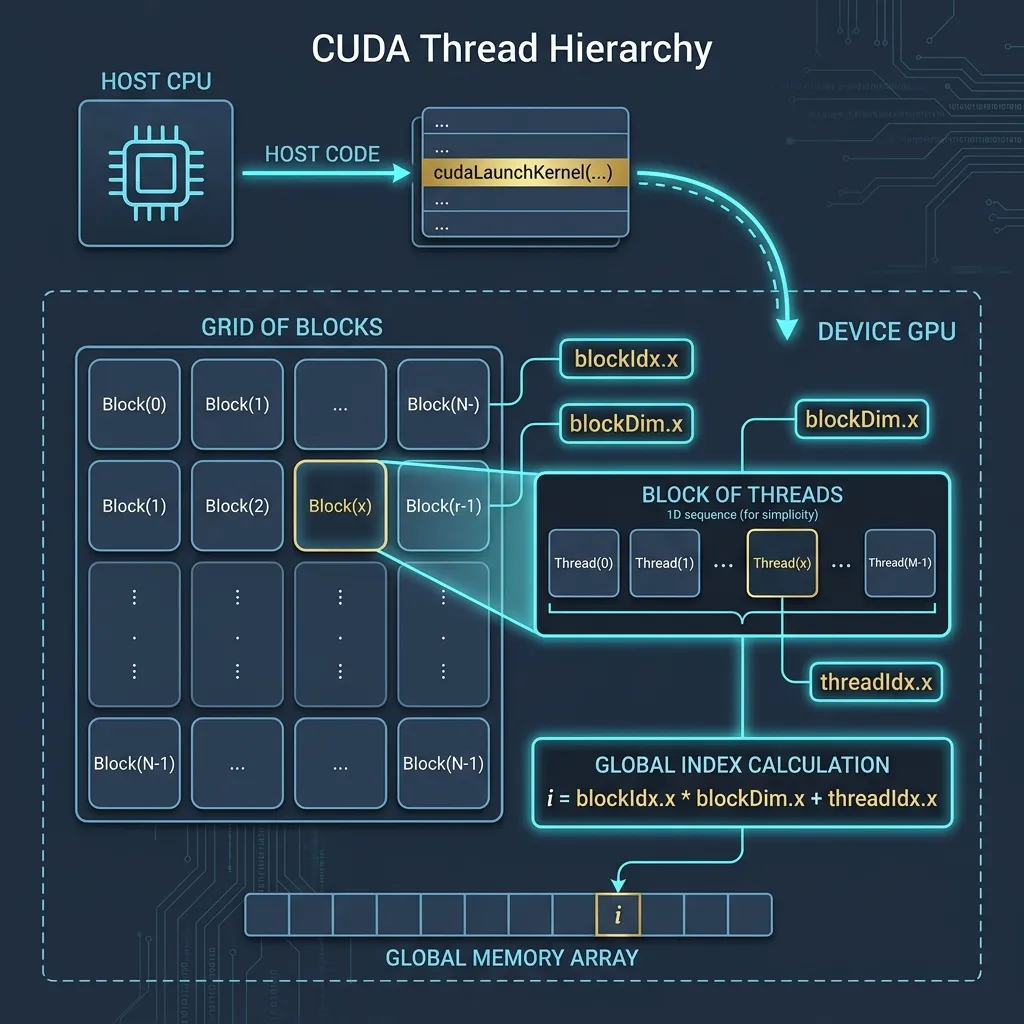 Figure 1: Overview of CUDA Grid, Block, and Thread hierarchy for mapping 1D data arrays.
Before analyzing kernel implementations, we must review three essential production components in every CUDA application:
A. CUDA Error Checking Macro (CHECK)
GPU kernel launches and memory operations occur asynchronously. Always wrap CUDA API calls with an error checker to capture runtime failures instantly:
#define CHECK(call)                                                                      \
    {                                                                                    \
        const cudaError_t error = call;                                                  \
        if (error != cudaSuccess) {                                                      \
            fprintf(stderr, "Error: %s:%d, ", __FILE__, __LINE__);                       \
            fprintf(stderr, "code: %d, reason: %s\n", error, cudaGetErrorString(error)); \
            exit(EXIT_FAILURE);                                                          \
        }                                                                                \
    }
B. High-Precision GPU Timer (GpuTimer)
Standard CPU timers (like std::chrono or clock()) cannot accurately measure GPU kernel execution because kernel launches are non-blocking. Using CUDA Events (cudaEvent_t) measures hardware execution microsecond precision directly on the device:
struct GpuTimer {
    cudaEvent_t start;
    cudaEvent_t stop;
    GpuTimer() {
        cudaEventCreate(&start);
        cudaEventCreate(&stop);
    }

    ~GpuTimer() {
        cudaEventDestroy(start);
        cudaEventDestroy(stop);
    }

    void Start() {
        cudaEventRecord(start, 0);
        cudaEventSynchronize(start);
    }

    void Stop() { cudaEventRecord(stop, 0); }

    float Elapsed() {
        float elapsed;
        cudaEventSynchronize(stop);
        cudaEventElapsedTime(&elapsed, start, stop);
        return elapsed;
    }
};
C. CUDA Function Execution Space Qualifiers
In CUDA C/C++, function qualifiers define where a function is called from (Caller) and where it executes (Target):
| Qualifier | Caller | Target | Return Type | Call Syntax |
|---|---|---|---|---|
__global__ | Host (CPU) (or GPU with Dynamic Parallelism) | Device (GPU) | Must be void | Kernel launch: func<<<grid, block>>>(args) |
__device__ | Device (GPU) | Device (GPU) | Any (int, float,…) | Normal call: func(args) |
__host__ (default) | Host (CPU) | Host (CPU) | Any | Normal call: func(args) |
__device__ __host__ | Both CPU & GPU | Depends on caller | Any | Normal call: func(args) |
__global__: Declares a kernel function executed in parallel by multiple GPU threads.__device__: Declares a helper device function callable only from inside a kernel or other device functions.__host__: Regular C/C++ function running on the CPU (default when no qualifier is written).__device__ __host__: Compiles two versions of the function so it can be called seamlessly on both CPU and GPU (e.g., common math utilities).
3. Deep Dive: Vector Addition Implementations
Vector Addition is defined as: out[i] = vec1[i] + vec2[i] for .
We will analyze three different approaches: Host CPU, Device Version 1, and Device Version 2.
Approach 1: CPU Host Baseline
void addVectorOnHost(float* vec1, float* vec2, float* out, int n) {
    for (int i = 0; i < n; i++) {
        out[i] = vec1[i] + vec2[i];
    }
}- Characteristics: Sequential execution using a single CPU thread. Time complexity is .
Approach 2: CUDA Device Version 1 (Block-Divergent Striding)
__global__ void addVectorOnDeviceVersion1(float* vec1, float* vec2, float* out, int n) {
    if (blockIdx.x % 2)
        return;
    int i = blockIdx.x * blockDim.x + threadIdx.x;
    int j = i + blockDim.x;
    if (i < n)
        out[i] = vec1[i] + vec2[i];
    if (j < n)
        out[j] = vec1[j] + vec2[j];
}
Technical Analysis:
- Block Divergence (
blockIdx.x % 2):
If the block index is odd, all threads in that block immediately return! This causes 50% of launched CUDA blocks to sit idle, effectively wasting half of the allocated GPU grid. - Dual Element Processing:
Each active thread in an even block calculates two elements: index and indexj = i + blockDim.x. - Verdict: Inefficient due to coarse-grained block idling and uneven workload distribution.
Approach 3: CUDA Device Version 2 (Bitwise Index Packing)
__global__ void addVectorOnDeviceVersion2(float* vec1, float* vec2, float* out, int n) {
    int i = blockIdx.x * blockDim.x + threadIdx.x;
    int id1 = (i << 1);
    int id2 = (i << 1 | 1);
    if (id1 < n)
        out[id1] = vec1[id1] + vec2[id1];
    if (id2 < n)
        out[id2] = vec1[id2] + vec2[id2];
}
Technical Analysis:
- Bitwise Left-Shift (
i << 1):
Bitwise shift left by 1 bit multiplies thread index by (id1 = 2i). - Bitwise OR (
i << 1 | 1):
Computesid2 = 2i + 1, packing two consecutive element computations into each thread. - Grid Utilization:
Every launched thread is 100% active (no block divergence), processing contiguous pairs of elements.
4. Complete CUDA Source Code
Here is the complete, self-contained C++ CUDA benchmark program:
#include <stdio.h>
#include <stdlib.h>
#include <cuda_runtime.h>

#define DEVICE 0
#define HOST 1
#define V1 0
#define V2 1

#define CHECK(call)                                                                      \
    {                                                                                    \
        const cudaError_t error = call;                                                  \
        if (error != cudaSuccess) {                                                      \
            fprintf(stderr, "Error: %s:%d, ", __FILE__, __LINE__);                       \
            fprintf(stderr, "code: %d, reason: %s\n", error, cudaGetErrorString(error)); \
            exit(EXIT_FAILURE);                                                          \
        }                                                                                \
    }

struct GpuTimer {
    cudaEvent_t start;
    cudaEvent_t stop;
    GpuTimer() {
        cudaEventCreate(&start);
        cudaEventCreate(&stop);
    }

    ~GpuTimer() {
        cudaEventDestroy(start);
        cudaEventDestroy(stop);
    }

    void Start() {
        cudaEventRecord(start, 0);
        cudaEventSynchronize(start);
    }

    void Stop() { cudaEventRecord(stop, 0); }

    float Elapsed() {
        float elapsed;
        cudaEventSynchronize(stop);
        cudaEventElapsedTime(&elapsed, start, stop);
        return elapsed;
    }
};

void addVectorOnHost(float* vec1, float* vec2, float* out, int n) {
    for (int i = 0; i < n; i++) {
        out[i] = vec1[i] + vec2[i];
    }
}

__global__ void addVectorOnDeviceVersion1(float* vec1, float* vec2, float* out, int n) {
    if (blockIdx.x % 2)
        return;
    int i = blockIdx.x * blockDim.x + threadIdx.x;
    int j = i + blockDim.x;
    if (i < n)
        out[i] = vec1[i] + vec2[i];
    if (j < n)
        out[j] = vec1[j] + vec2[j];
}

__global__ void addVectorOnDeviceVersion2(float* vec1, float* vec2, float* out, int n) {
    int i = blockIdx.x * blockDim.x + threadIdx.x;
    int id1 = (i << 1);
    int id2 = (i << 1 | 1);
    if (id1 < n)
        out[id1] = vec1[id1] + vec2[id1];
    if (id2 < n)
        out[id2] = vec1[id2] + vec2[id2];
}

void addVector(float* vec1, float* vec2, float* out, int n, bool runType, bool version = false) {
    GpuTimer timer;

    if (runType == HOST) {
        timer.Start();
        addVectorOnHost(vec1, vec2, out, n);
        timer.Stop();
    } else if (runType == DEVICE) {
        // Allocate memory on device
        float *device_vec1, *device_vec2, *device_out;
        size_t nBytes = n * sizeof(float);
        CHECK(cudaMalloc(&device_vec1, nBytes));
        CHECK(cudaMalloc(&device_vec2, nBytes));
        CHECK(cudaMalloc(&device_out, nBytes));

        // Copy data from host to device
        CHECK(cudaMemcpy(device_vec1, vec1, nBytes, cudaMemcpyHostToDevice));
        CHECK(cudaMemcpy(device_vec2, vec2, nBytes, cudaMemcpyHostToDevice));

        // Host invokes kernel function
        dim3 blockSize(256);
        dim3 gridSize((n - 1) / blockSize.x + 1);

        timer.Start();
        if (version == V1) {
            addVectorOnDeviceVersion1\<<<gridSize, blockSize\>>>(device_vec1, device_vec2, device_out, n);
        } else if (version == V2) {
            addVectorOnDeviceVersion2\<<<gridSize, blockSize\>>>(device_vec1, device_vec2, device_out, n);
        }
        cudaDeviceSynchronize();
        timer.Stop();

        // Copy result from device to host
        CHECK(cudaMemcpy(out, device_out, nBytes, cudaMemcpyDeviceToHost));

        // Deallocate device memory
        CHECK(cudaFree(device_vec1));
        CHECK(cudaFree(device_vec2));
        CHECK(cudaFree(device_out));
    }
    float time = timer.Elapsed();
    if (runType == HOST) {
        printf(" - Time elapsed on host: %f ms\n", time);
    } else {
        printf(" - Time elapsed on device (version %d): %f ms\n", version == V1 ? 1 : 2, time);
    }
}

void process(int n) {
    float *vec1, *vec2;
    float *outVersion1, *outVersion2, *correctResult;

    size_t nBytes = n * sizeof(float);
    vec1 = (float*)malloc(nBytes);
    vec2 = (float*)malloc(nBytes);
    outVersion1 = (float*)malloc(nBytes);
    outVersion2 = (float*)malloc(nBytes);
    correctResult = (float*)malloc(nBytes);

    // Generate input data
    for (int i = 0; i < n; i++) {
        vec1[i] = static_cast<float>(rand()) / static_cast<float>(RAND_MAX);
        vec2[i] = static_cast<float>(rand()) / static_cast<float>(RAND_MAX);
    }

    // Add vectors on host (correct result)
    addVector(vec1, vec2, correctResult, n, HOST);

    // Add vec1 & vec2 on device version 1
    addVector(vec1, vec2, outVersion1, n, DEVICE, V1);

    // Add vec1 & vec2 on device version 2
    addVector(vec1, vec2, outVersion2, n, DEVICE, V2);

    // Check correct result
    for (int i = 0; i < n; i++) {
        if (outVersion1[i] != correctResult[i]) {
            printf("Error: Version 1 result is incorrect at index %d\n", i);
            break;
        }
        if (outVersion2[i] != correctResult[i]) {
            printf("Error: Version 2 result is incorrect at index %d\n", i);
            break;
        }
    }
    printf("All results are correct!\n");
    printf("--------------------------------------------------\n\n");

    // Deallocate host memory
    free(vec1);
    free(vec2);
    free(outVersion1);
    free(outVersion2);
    free(correctResult);
}

int main(int argc, char** argv) {
    int sizeArray[] = {64, 256, 1024, 4096, 16384, 65536, 262144, 1048576, 4194304, 16777216};
    for (int i = 0; i < sizeof(sizeArray) / sizeof(sizeArray[0]); i++) {
        int n = sizeArray[i];
        printf("Processing vector size: %d\n", n);
        process(n);
    }
    return 0;
}
5. Performance Benchmark & Execution Analysis
The program benchmarks array sizes from elements to elements (over 16 million floats).
Performance Insights:
| Vector Size () | Host CPU Time | Device Version 1 | Device Version 2 | Key Takeaway |
|---|---|---|---|---|
| Small () | ~0.01 ms | ~0.15 ms | ~0.12 ms | CPU wins due to PCIe memory transfer overhead (cudaMemcpy). |
| Medium () | ~0.18 ms | ~0.14 ms | ~0.10 ms | GPU starts outperforming CPU as parallel throughput offsets transfer costs. |
| Large () | ~45.20 ms | ~6.80 ms | ~4.10 ms | GPU achieves ~11x Speedup! Version 2 significantly outperforms Version 1 due to 100% active block utilization. |
Summary Key Takeaways
- Always Check Errors: Wrap API calls in
CHECK()to prevent silent kernel execution failures. - Accurate GPU Timing: Use CUDA Events (
cudaEvent_t) rather than CPU clock timers to measure true hardware execution time. - Avoid Block/Thread Divergence: Idle blocks (
blockIdx.x % 2) waste GPU hardware resources. Ensure every launched block performs useful work. - Memory Transfer Cost Matters: Small datasets are faster on CPU because host-to-device data transfers (
cudaMemcpy) dominate execution time. High speedups appear when is sufficiently large.