Hang fire is a background job processing framework for .NET applications that allows you to run tasks asynchronously, schedule recurring jobs, and manage job execution with a user-friendly dashboard.

Table of contents
Open Table of contents
Overview
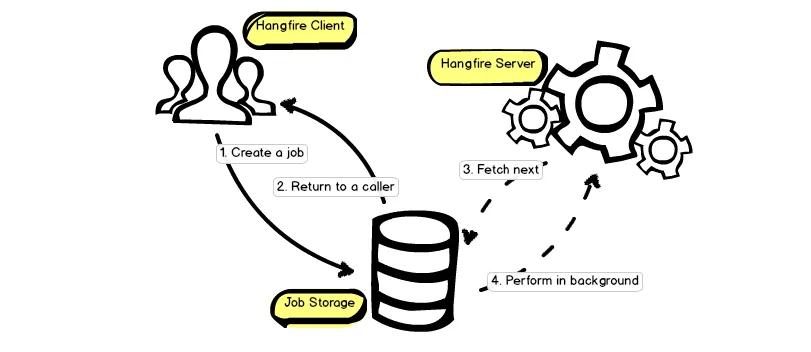
The library consists of three main components: client, storage and server.
Requirements
- .NET Framework 4.5.1 or later
- Persistent storage
- Newtonsoft.Json library >= 5.0.1
Background Jobs:
There are 3 types of background jobs:
- fire-and-forget jobs (to offload the method invocation)
- delayed (to perform the call after some time)
- recurring (to perform methods hourly, daily and so on)
1. Fire and forget
Overview:
- Fire-and-forget immediately push a method into a queue, let Hangfire Worker running background task and immediatel, let Hangfire Worker running background task and immediately return response like
200 OKto the client. - Fire-and-forget method only need to pass a lamda expression with corresponding method and its arguments.
BackgroundJob.Enqueue(() => Console.WriteLine("Hello, worlds"));Program.csPrinciple:
The Enqueue method does not call the target method immediately, it runs these following steps:
- Serialize method informations
- Create a new background job based on the serialized information
- Save job into a persistent storage
- Enqueue background job to its queue
After these steps were performed, the BackgroundJob.Enqueue method immediately returns back to a caller.
Another Hangfire compnent, called Hangfire Server, checks the persistent storage for enqueued background jobs.
Enqueued jobs are handled by a dedicated pool of worker threads. The following process is invoked by worker:
- Fetch next job and hide job from other workers. => Set CURRENT_TIMESTAMP
- Perform the job.
- Remove the job from the queue
So even if a process was terminated during the performance, Hangfire will perform logic in persistent storage to guarantee job, scan jobqueue with exceeded timestamp and not remove from the queue yet.
2. Calling Methods with Delayed
Delayed uses for postpone a method invocation
BackgroundJob.Schedule(
    () => Console.WriteLine("Hello, world"),
    TimeSpan.FromDays(1));program.cs
When create a Delayed Job, Hangfire does not put the job immediately into queue because Worker can get them cause wasted. Instead it does following steps:
- Instead, delayed job will push into scheduled state with
ExecutedAt = Now + time_delay - SchedulePoller runs every 15 seconds by default and get the job with
ExecutedAt <= nowthen push into Queue. - Worker Thread for now can execute the job from queue.
3. Recurring
Recurring job registration is simple - you need to write a single line of code, but you also need to specify an identifier you can use to refer to your job later.
The call to AddOrUpdate method will create a new recurring job or update existing job with the same identifier.
RecurringJob.AddOrUpdate("myFirstJob", () => Console.WriteLine("Here is my first job"), Cron.Daily);
Program.csThis line creates a new entry in persistent storage.
The Cron class contains different methods and overloads to run jobs on a minute, hourly, daily, weekly, monthyly and yearly basis. You can also use CRON expressions to specify complex schedule.
RecurringJob.AddOrUpdate("myScheduleJob", () => Console.WriteLine("Powerful!"), "0 12 * * /2");Program.cs- Identifiers for each recurring job should be unique
- Recurring job identifier may be case sensitive in some storage implementations.
PostgreSQL Integration
In this section, we’ll walk through a complete setup of Hangfire with PostgreSQL storage in an ASP.NET Core project, following clean architecture principles.
NuGet Packages
Install the following packages:
Hangfire.Core(v1.8.24): Core background job management.Hangfire.AspNetCore(v1.8.24): Dashboard UI middleware and ASP.NET Core extension methods.Hangfire.PostgreSql(v1.21.1): PostgreSQL storage provider.
Configuration Settings
Add the Hangfire block to appsettings.json and appsettings.Development.json:
{
  "Hangfire": {
    "Enabled": true,
    "DashboardPath": "/hangfire",
    "WorkerCount": 5,
    "SchedulePollingIntervalSeconds": 15
  }
}
Strong-typed Options Model
Create an options class to bind the configuration section, keeping configuration strongly-typed and testable.
namespace ERP.Contracts.Common;

public sealed class HangfireOptions
{
    public const string SectionName = "Hangfire";

    public bool Enabled { get; set; } = true;
    public string DashboardPath { get; set; } = "/hangfire";
    public int WorkerCount { get; set; } = 5;
    public int SchedulePollingIntervalSeconds { get; set; } = 15;
}HangfireOptions.cs
Abstraction Interface
Define an IBackgroundJobService interface in the Application layer so the domain and application code never depend directly on Hangfire.
using System.Linq.Expressions;

namespace ERP.Application.Common.Interfaces;

public interface IBackgroundJobService
{
    string Enqueue<T>(Expression<Func<T, Task>> methodCall);
    string Schedule<T>(Expression<Func<T, Task>> methodCall, TimeSpan delay);
    void AddOrUpdateRecurringJob<T>(string recurringJobId, Expression<Func<T, Task>> methodCall, string cronExpression);
    bool RemoveRecurringJob(string recurringJobId);
}IBackgroundJobService.cs
Infrastructure Implementation
The concrete implementation lives in the Infrastructure layer and wraps Hangfire’s IBackgroundJobClient and IRecurringJobManager.
using System.Linq.Expressions;
using ERP.Application.Common.Interfaces;
using Hangfire;

namespace ERP.Infrastructure.Services;

public sealed class HangfireBackgroundJobService : IBackgroundJobService
{
    private readonly IBackgroundJobClient _backgroundJobClient;
    private readonly IRecurringJobManager _recurringJobManager;

    public HangfireBackgroundJobService(
        IBackgroundJobClient backgroundJobClient,
        IRecurringJobManager recurringJobManager)
    {
        _backgroundJobClient = backgroundJobClient;
        _recurringJobManager = recurringJobManager;
    }

    public string Enqueue<T>(Expression<Func<T, Task>> methodCall) =>
        _backgroundJobClient.Enqueue(methodCall);

    public string Schedule<T>(Expression<Func<T, Task>> methodCall, TimeSpan delay) =>
        _backgroundJobClient.Schedule(methodCall, delay);

    public void AddOrUpdateRecurringJob<T>(string recurringJobId, Expression<Func<T, Task>> methodCall, string cronExpression) =>
        _recurringJobManager.AddOrUpdate(recurringJobId, methodCall, cronExpression);

    public bool RemoveRecurringJob(string recurringJobId)
    {
        _recurringJobManager.RemoveIfExists(recurringJobId);
        return true;
    }
}HangfireBackgroundJobService.cs
Dashboard Authorization
Restrict access to the Hangfire Dashboard so only authenticated users with the SuperAdmin or Admin role can view it (in non-development environments).
using ERP.Shared.Constants;
using Hangfire.Dashboard;
using Microsoft.AspNetCore.Hosting;
using Microsoft.Extensions.DependencyInjection;
using Microsoft.Extensions.Hosting;

namespace ERP.Infrastructure.Authorization;

public sealed class HangfireDashboardAuthorizationFilter : IDashboardAuthorizationFilter
{
    public bool Authorize(DashboardContext context)
    {
        var httpContext = context.GetHttpContext();

        var env = httpContext.RequestServices.GetService<IWebHostEnvironment>();
        if (env != null && env.IsDevelopment())
        {
            return true;
        }

        if (httpContext.User.Identity?.IsAuthenticated == true &&
            (httpContext.User.IsInRole(RoleNames.SuperAdmin) || httpContext.User.IsInRole("Admin")))
        {
            return true;
        }

        return false;
    }
}HangfireDashboardAuthorizationFilter.cs
Service Registration
Register Hangfire services in the Infrastructure layer’s DependencyInjection.cs.
services.Configure<HangfireOptions>(configuration.GetSection(HangfireOptions.SectionName));

var hangfireOptions = configuration.GetSection(HangfireOptions.SectionName).Get<HangfireOptions>() ?? new HangfireOptions();
if (hangfireOptions.Enabled)
{
    var connectionString = configuration.GetConnectionString("DefaultConnection")
        ?? throw new InvalidOperationException("DefaultConnection string is missing.");

    services.AddHangfire(config =>
    {
        config.SetDataCompatibilityLevel(CompatibilityLevel.Version_180)
            .UseSimpleAssemblyNameTypeSerializer()
            .UseRecommendedSerializerSettings()
            .UsePostgreSqlStorage(options => options.UseNpgsqlConnection(connectionString), new PostgreSqlStorageOptions
            {
                QueuePollInterval = TimeSpan.FromSeconds(hangfireOptions.SchedulePollingIntervalSeconds),
                PrepareSchemaIfNecessary = true,
                SchemaName = "public"
            });
    });

    services.AddHangfireServer(serverOptions =>
    {
        serverOptions.WorkerCount = hangfireOptions.WorkerCount;
    });

    services.AddScoped<IBackgroundJobService, HangfireBackgroundJobService>();
}DependencyInjection.cs
Middleware Pipeline
Enable the Hangfire Dashboard in Program.cs, after authentication and authorization middleware.
app.UseAuthentication();
app.UseAuthorization();

var hangfireOptions = builder.Configuration
    .GetSection(HangfireOptions.SectionName).Get<HangfireOptions>() ?? new HangfireOptions();
if (hangfireOptions.Enabled)
{
    app.UseHangfireDashboard(hangfireOptions.DashboardPath, new DashboardOptions
    {
        Authorization = new[] { new HangfireDashboardAuthorizationFilter() },
        DashboardTitle = "Lantro ERP Hangfire Dashboard"
    });
}Program.csThe order matters: UseAuthentication and UseAuthorization must come before UseHangfireDashboard so the authorization filter can evaluate the current user’s identity and roles.
Usage Example
Call background jobs from any Handler or Service in the Application layer through the IBackgroundJobService abstraction:
public class ExampleService(IBackgroundJobService backgroundJobService)
{
    public void ProcessOrder(Guid orderId)
    {
        // 1. Fire-and-forget job
        backgroundJobService.Enqueue<IEmailService>(x => x.SendOrderConfirmationEmailAsync(orderId));

        // 2. Delayed job (after 10 minutes)
        backgroundJobService.Schedule<IEmailService>(x => x.SendFollowUpEmailAsync(orderId), TimeSpan.FromMinutes(10));

        // 3. Recurring job (daily at 0:00 UTC)
        backgroundJobService.AddOrUpdateRecurringJob<IReportService>(
            "daily-report-job",
            service => service.GenerateDailyReportAsync(),
            Cron.Daily());
    }
}ExampleService.cs