When building modern web applications, one of the biggest challenges is handling high traffic. If too many users hit your application at once, your servers can easily run out of memory, exhaust database connections, and crash.
This is where a Message Broker comes to the rescue. In this post, we’ll explain how message brokers work, how they protect your servers from crashing, and when to use them.

Table of contents
Open Table of contents
Problems & Solutions
1. Synchronous Communication

Photo by Phuc Dang ;))
In a traditional request-response model, Service A calls Service B and must wait (block) until Service B finishes and responds.
- The Problem: If Service B is slow, bottlenecked, or crashes, Service A is held hostage. This creates a cascading failure across your entire system.
- The Solution: A Message Broker decouples them. Service A publishes the task message to the broker and immediately returns a response to the user. Service B processes the message in the background when it is ready. If Service B goes offline temporarily, messages are queued up safely and processed once it is back online.
2. High traffic
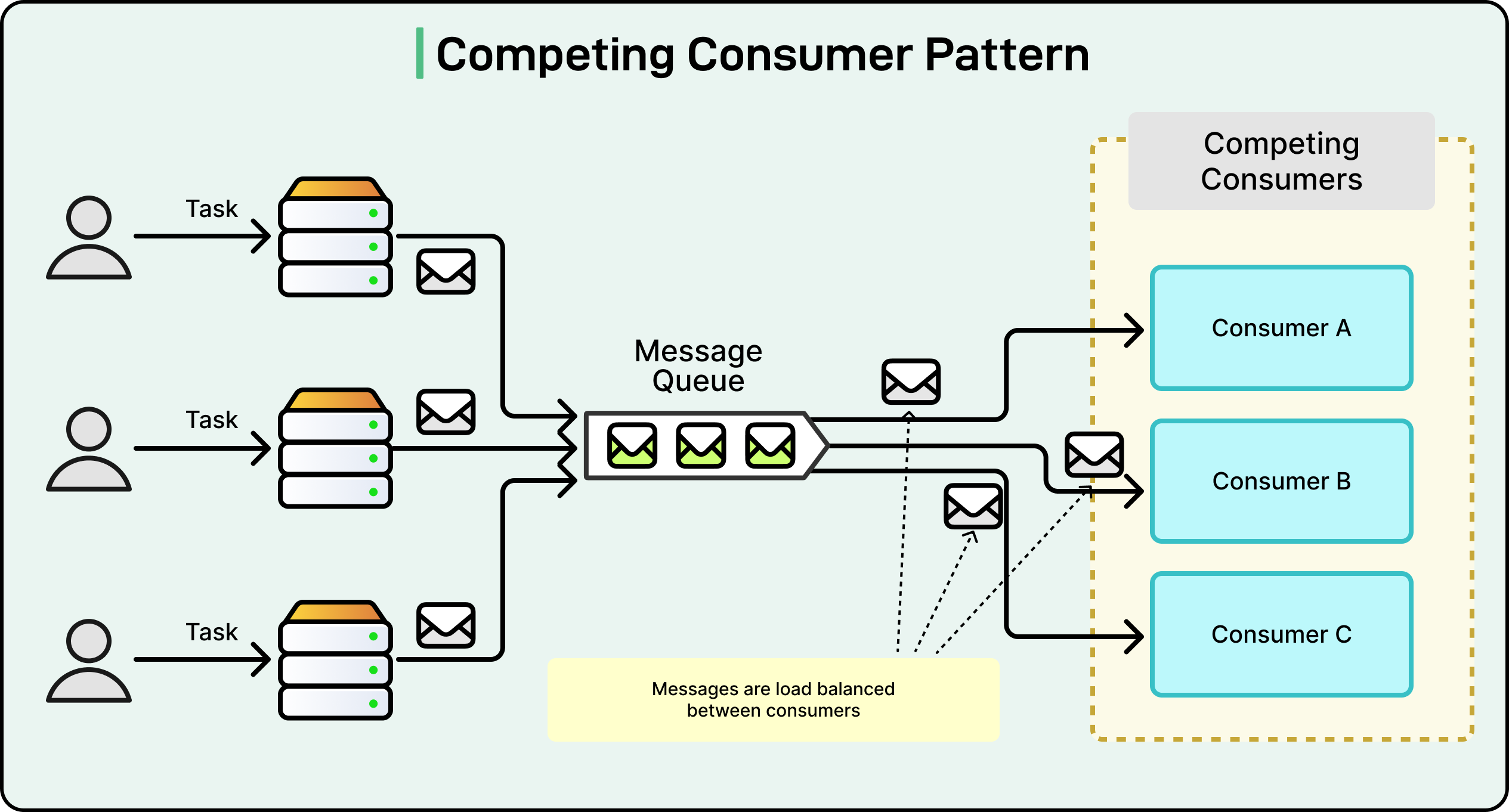
Photo by Phuc Dang ;))
A sudden surge of incoming requests (e.g., during a flash sale or viral marketing campaign) forces your servers to process everything at once.
- The Problem: Under heavy concurrent load, server resources (CPU, memory, and database connections) quickly exhaust. This results in timeout errors or complete server crashes.
- The Solution: The Message Broker acts as a buffer (load leveling). The web server quickly pushes incoming requests into the queue and responds to the user immediately. Downstream workers consume and process these tasks at a steady, sustainable rate. This protects your database and backend services from being overwhelmed.
3. Send multiple services

Photo by Phuc Dang ;))
Sometimes a single event needs to trigger actions in multiple services (e.g., user signup needs to trigger an email, update analytics, and notify the billing system).
- The Problem: Without a broker, your main application must make individual, sequential calls to each system. This increases latency and tightly couples the services—meaning if any downstream system changes, you must update the core application.
- The Solution: The Message Broker uses a Publish-Subscribe (Pub/Sub) pattern. Your main service publishes a single event (e.g.,
UserRegistered) to a topic. Any service interested in this event (Email, Analytics, Billing) simply subscribes to the topic and receives the message independently. Your main service doesn’t need to know who the subscribers are or manage calls to them.
What is a Message Broker?
Think of a message broker as a digital post office.
Instead of you delivering a letter directly to your friend’s hands (synchronous communication), you drop it in a mailbox. The post office holds the letter and delivers it to your friend when they are ready.
In software:
- Producer: The application that sends the data (e.g., your frontend web server).
- Message: The data/task payload (e.g., “Send a welcome email to user ID 45”).
- Queue: The storage buffer inside the message broker that holds messages in order.
- Consumer: The background worker that processes the message.
Best Use Cases: Preventing Server Crashes - The Power of Buffering (Load Leveling)
To understand how a message queue saves your server from crashing, let’s look at two scenarios:
Scenario A: Without a Message Broker (Direct HTTP)
Imagine you run an e-commerce store during a flash sale.
  [ Client Requests ]
          │
          │ (10,000 req/sec)
          ▼
    [ Web Server ] ──(Direct Blocking Calls)──► [ Database ]
          │
          ▼
💥 CRASH! (OOM / Timeout)- 10,000 users click “Buy Now” at the exact same second.
- Your web server tries to handle all 10,000 requests simultaneously. It has to charge credit cards, generate invoices, and write to the database.
- The server memory spikes, the database runs out of available connections, and the entire system crashes.
- Your users get a frustrating
502 Bad Gatewayerror.
Scenario B: With a Message Broker (Queue-Based Load Leveling)
Now, let’s introduce a message queue as a buffer.
  [ Client Requests ]
          │
          │ (10,000 req/sec)
          ▼
    [ Web Server ]
          │
          │ (Write Task to Queue)
          ▼
   [ Message Queue ]  ◄── (Stores & buffers the load)
          │
          │ (Steady stream of tasks)
          ▼
[ Background Worker ] ──(Process 500 req/sec)──► [ Database ]- The same 10,000 users click “Buy Now”.
- The web server does not process the orders immediately. Instead, the web server quickly pushes 10,000 task messages into the Message Queue and immediately responds to the user: “Your order is being processed!” (Response time: < 50ms). The Message Queue itself does not communicate with the user.
- The Message Queue safely stores all 10,000 messages.
- Your Background Workers pull and process messages from the queue at a steady, manageable pace (e.g., 500 orders per second).
- The database stays healthy, the server never runs out of memory, and no orders are lost.
This pattern is called Load Leveling or Traffic Shaving. It turns a massive, unpredictable spike of traffic into a smooth, constant stream of work.
Core Messaging Models
Most message brokers support two main ways of sending messages:
1. Point-to-Point (Queue)
A message is sent to a queue and is processed by exactly one worker. Once processed, it is deleted.
- Best for: Task delegation (e.g., sending emails, resizing uploaded images).
2. Publish-Subscribe (Pub/Sub)
In the Pub/Sub model, messages are broadcasted in a one-to-many fashion. The producer publishes a message to a Topic, and the broker duplicates and forwards that message to all services subscribed to that topic.
                       ┌──► [ Subscriber A: Email Service ]
                       │
  [ Publisher ] ──► ( Topic ) ──┼──► [ Subscriber B: Analytics Service ]
                       │
                       └──► [ Subscriber C: Billing Service ]
How it works:
-
The Analogy: Think of it like subscribing to a YouTube channel. When a creator uploads a new video (publishes to a topic), YouTube automatically notifies all subscribers. The creator doesn’t need to know who the subscribers are or send the video to them individually.
-
Decoupled Architecture: The publisher has zero knowledge of who the subscribers are. You can add a new service (e.g., a “Recommendation Engine” subscribing to the sign-up topic) without modifying a single line of code in your publisher service.
-
Asynchronous Fan-out: A single event triggers multiple independent background workflows simultaneously.
-
Best for: Event-driven microservices, real-time notifications, and logging/telemetry pipelines.
RabbitMQ vs. Apache Kafka: A Quick Comparison
If you’re looking to adopt a message broker, you will most likely choose between these two:
- RabbitMQ: A “Smart Broker”. It focuses on complex routing rules (e.g., sending messages to specific queues based on headers or keys). Once a message is consumed, RabbitMQ deletes it. It is excellent for traditional background task queues.
- Apache Kafka: A “Dumb Broker, Smart Consumer”. It is an append-only commit log. Messages are kept on disk even after they are read, allowing you to replay them. It is built for massive scale and real-time data streaming.
Conclusion
Using a message broker is a cheat code for building reliable backend systems. By decoupling your web servers from heavy background processing, you protect your infrastructure from traffic spikes, prevent database crashes, and provide a much better user experience.